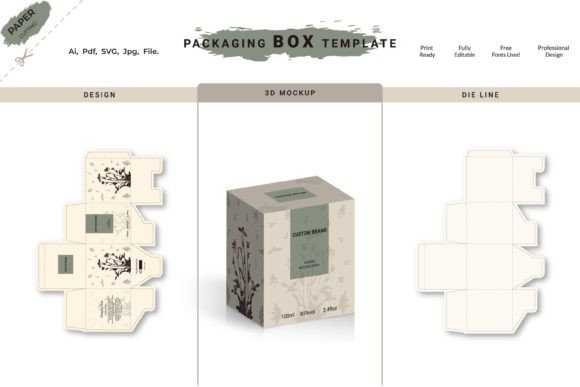
Everything You Need to Know About Die-cut 3D Box Template Design
Die-cut 3D box template design has become a powerful tool for both creative professionals and hobbyists who want to bring their packaging visions to life. Whether you're designing custom boxes for product packaging, event invitations, or unique promotional materials, having access to high-quality digital templates can streamline your workflow and enhance the final outcome. These templates are not only visually appealing but also incredibly practical when it comes to customization and scalability.
What is a Die-cut 3D Box Template?
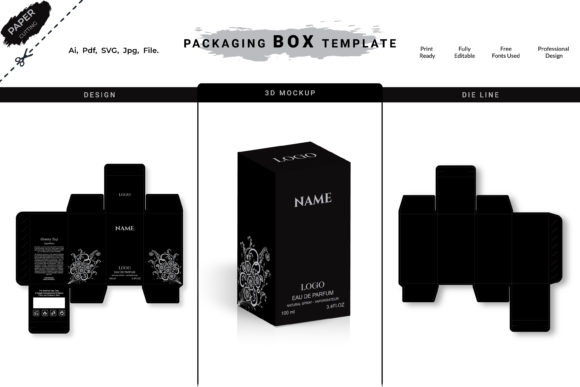
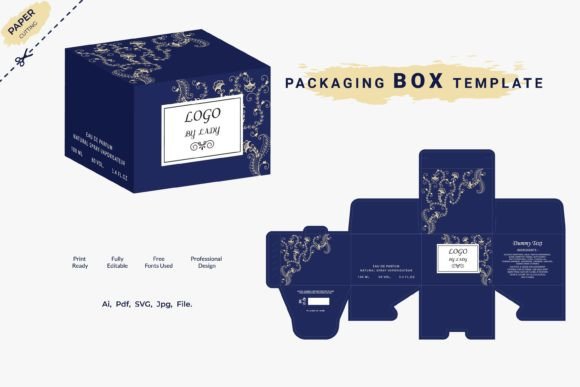
A die-cut 3D box template is essentially a pre-designed layout that allows users to create three-dimensional boxes using digital tools. These templates come in vector formats like AI (Adobe Illustrator) and SVG, which means they can be scaled to any size without losing quality. The "die-cut" aspect refers to the precision of the cuts made during the manufacturing process — something these templates help simulate digitally before production begins.
With these templates, you get a clear visual of how your box will look once assembled. They often include fold lines, tabs, and cutouts, mimicking real-world box structures. This makes it easier to visualize the end result and make necessary adjustments before sending the file to print or cutting machines.
The Value of Vector-Based Design
One of the standout features of Die-cut 3D Box Template Design is its use of vector graphics. Unlike raster images, which can pixelate when resized, vector-based designs maintain sharpness and clarity at any scale. This is especially important when working with packaging, where dimensions might vary depending on the product being housed inside.
Having 100 original vector designs gives you an extensive library to choose from, ensuring that your project stands out from the competition. Each design is crafted with attention to detail, allowing you to focus more on branding and less on the technicalities of layout creation.
Formats Included in Your Download
When you purchase a Die-cut 3D box template package, you typically receive a comprehensive zip file containing multiple usable formats:
- AI File: Perfect for editing in Adobe Illustrator. It allows full customization of colors, fonts, and shapes.
- PDF Print File: Ideal for sending directly to a printer. The format ensures all elements remain intact and properly aligned.
- SVG File: Great for use with cutting machines like Cricut or Silhouette. Its scalability and clean lines make it suitable for precise die-cutting.
- JPG File: Useful for quick previews or sharing online. While not editable, it provides a realistic view of the final design.
This multi-format approach ensures compatibility across different platforms and tools, giving you the flexibility to work in the environment you're most comfortable with.
How to Use Die-cut 3D Box Templates Effectively
Using a Die-cut 3D Box Template Design is straightforward, but understanding the best practices can significantly improve your results. Here's a simple guide to getting started:
- Choose the Right Template: Browse through the available options and select one that aligns with your project’s needs. Consider factors like box shape, size, and whether it includes windows or cutouts.
- Customize the Layers: Most templates allow you to place your artwork above the base structure in a separate layer. This lets you add logos, text, or other graphics without altering the underlying box design.
- Edit Colors and Typography: With vector files, changing colors or fonts is as easy as selecting the object and applying new properties. This makes personalization a breeze.
- Resize Without Quality Loss: Because the designs are vector-based, you can easily adjust the dimensions of your box to fit various products or spaces.
- Prepare for Printing or Cutting: Once satisfied with the layout, export the file in the appropriate format (PDF for printing, SVG for cutting machines). Ensure you follow any specific guidelines provided by your printer or machine manufacturer.
Real-World Applications
These templates are versatile and can be used in a variety of industries and projects:
- Retail Packaging: From luxury gift boxes to eco-friendly containers, Die-cut 3D box templates help businesses present their products professionally and attractively.
- Event Invitations: Customized 3D boxes can serve as eye-catching invitation holders or keepsakes for weddings, birthdays, and corporate events.
- Product Launches: Brands often use unique box designs to generate excitement and stand out on shelves or in online listings.
- Craft Projects: Artists and DIY enthusiasts utilize these templates for handmade gifts, home decor items, and personalized storage solutions.
For example, a small business launching a line of artisanal chocolates could use a Die-cut 3D box template to create a distinctive display that reflects their brand identity. By adding custom artwork and adjusting the size to match their product, they ensure a polished and professional presentation.
Why Choose Digital Files Over Physical Templates?
In today's fast-paced digital world, working with Digital Cut Files offers numerous advantages over traditional physical templates. First and foremost, digital templates are instantly accessible and don’t require shipping. You’ll receive a single zip file containing all the necessary assets, ready for immediate use.
Tools like WinRAR or WinZip make unzipping and organizing your files simple, even if you’re not tech-savvy. Additionally, since you’re working with editable files, you can tweak the design to suit your exact specifications — no need to settle for a generic solution.
It’s also worth noting that these are mockup files. This means they’re designed for visual representation and customization rather than direct manufacturing. However, they provide a clear blueprint for what the finished box should look like, making them invaluable during the planning phase.
Customization for Business and Personal Use
Whether you're designing for a startup or a personal project, Die-cut 3D box templates offer the freedom to personalize every element. You can incorporate your logo, choose brand-specific colors, and even modify structural details like tab placement or panel depth.
For businesses, this level of customization is essential for maintaining a cohesive brand image. A well-designed box can reinforce brand recognition and leave a lasting impression on customers. For individuals, it allows for creative expression and tailored gifts that reflect personal style or occasion themes.
Common Considerations Before Using a Die-cut 3D Box Template
Before diving into your next project, there are a few key points to keep in mind when using Die-cut 3D box templates:
- Printer Compatibility: Make sure your chosen template works with your printer's specifications. Some printers may require certain bleed margins or color profiles.
- Material Thickness : While the template handles the design, the material you choose for printing or cutting will affect how the box folds and holds together. Always test with sample materials if possible.
- File Organization: Since each template includes multiple layers and formats, take time to understand the file structure before making edits. This helps avoid accidental changes to critical parts of the design.
- Design Intent: Remember that the goal of a Die-cut 3D box is to balance aesthetics with functionality. A beautiful design won’t matter if the box doesn't hold up structurally.
Another thing to note is that no physical box-making template is included in the download. The digital files are meant to guide the creation process, not replace the actual materials needed for assembly. If you're new to die-cutting, it may be helpful to research the type of paperboard or cardstock best suited for your design to ensure durability and ease of folding.
Benefits of Working with Die-cut 3D Box Templates
There are several compelling reasons why professionals and creators alike rely on Die-cut 3D box templates:
- Time Efficiency: Instead of building a box from scratch, you can start with a proven template and focus on customizing it to meet your needs.
- Cost-Effective: High-quality vector designs eliminate the need for hiring a designer from scratch, especially for those on a tight budget.
- Scalability: As mentioned earlier, the ability to resize without quality loss is a major benefit when working with variable product sizes or quantities.
- Consistency: Using the same template for multiple units ensures uniformity in design, which is crucial for branding and packaging consistency.
- Flexibility: You can experiment with different layouts, textures, and finishes without affecting the integrity of the box structure.
For instance, if you're creating packaging for a seasonal product line, you can use the same base template but change the artwork and colors for each season, saving time while maintaining a consistent look.
Working with Mockups and Realistic Visualizations
Many Die-cut 3D box templates include mockup views that show how the design would appear when folded and displayed. These mockups are useful for presentations, client reviews, or social media content. Even though they're part of the template package, they’re not meant for production — instead, they serve as inspiration and a way to showcase the potential of your design.
By separating the mockup from the actual cutting file, you can still use the visual reference to refine your choices before moving forward with the final version. This dual-use capability makes the templates a valuable asset in both creative and commercial workflows.
Getting Started with Your Own Die-cut 3D Box Project
If you're ready to begin using Die-cut 3D box templates, here are some tips to help you succeed:
- Plan Ahead: Think about the purpose of the box, the product it will contain, and the message you want to convey. This helps inform your design decisions.
- Use Layering: Take advantage of layered files to manage different components of your design separately. This makes revisions and updates much simpler.
- Test Print: Before going into mass production, print a small sample to check alignment, folding accuracy, and overall appearance.
- Stay Organized: Keep copies of your original template and save versions of your customized files so you can go back if needed.
- Seek Feedback: Show your design to others before finalizing it. A fresh perspective can highlight issues you might have missed.
By following these steps, you'll be able to leverage the power of Die-cut 3D Box Template Design to produce professional-grade packaging that meets your expectations and exceeds those of your audience.
Final Thoughts on Die-cut 3D Box Templates
Die-cut 3D box templates are more than just convenient — they're a gateway to creativity and efficiency. With 100 original vector designs at your disposal, you can explore countless possibilities without the hassle of starting from zero each time. Whether you're a seasoned designer or someone just dipping their toes into the world of packaging design, these templates provide the foundation you need to build something truly remarkable.
Remember, the key to success lies in understanding the tools you're working with. Spend some time familiarizing yourself with the AI and SVG files, and don’t hesitate to reach out to online communities or forums if you run into challenges. With the right mindset and resources, you can transform your ideas into stunning, functional 3D boxes that elevate your brand or craft project to the next level.